On encountering a macro C64Studio attempts these four possibilities in this order:
1) Control Key Macros
2) Built In Macros
3) Included Symbol Value
4) Literal Value
Control Key Macros
For compatiblity with several conversion tools these macros are predefined:
| Macro Content | PETSCII Value |
|---|---|
| black, blk | 144 |
| white, wht | 5 |
| red | 28 |
| cyn | 159 |
| purple, pur | 156 |
| green, grn | 30 |
| blue, blu | 31 |
| yellow, yel | 158 |
| orange, orng | 129 |
| brown, brn | 149 |
| light red, lred | 150 |
| dark gray, dark grey, gry1 | 151 |
| gray, grey, gry2 | 152 |
| light green, lgrn | 153 |
| light blue, lblu | 154 |
| light gray, light grey, gry3 | 155 |
| reverse on, rvson, rvon | 18 |
| reverse off, rvsoff, rvof | 146 |
| cursor down, down | 17 |
| cursor up, up | 145 |
| cursor left, left | 157 |
| cursor right, rght, right | 29 |
| del | 20 |
| insert, ins | 148 |
| clr | 147 |
| home | 19 |
| F1 | 133 |
| F3 | 134 |
| F5 | 135 |
| F7 | 136 |
| F2 | 137 |
| F4 | 138 |
| F6 | 139 |
| F8 | 140 |
| CBM-A | 176 |
| CBM-B | 191 |
| CBM-C | 188 |
| CBM-D | 172 |
| CBM-E | 177 |
| CBM-F | 187 |
| CBM-G | 165 |
| CBM-H | 180 |
| CBM-I | 162 |
| CBM-J | 181 |
| CBM-K | 161 |
| CBM-L | 182 |
| CBM-M | 170 |
| CBM-N | 167 |
| CBM-O | 185 |
| CBM-P | 175 |
| CBM-Q | 171 |
| CBM-R | 178 |
| CBM-S | 174 |
| CBM-T | 163 |
| CBM-U | 184 |
| CBM-V | 190 |
| CBM-W | 179 |
| CBM-X | 189 |
| CBM-Y | 183 |
| CBM-Z | 173 |
| CBM-+ | 166 |
| CBM-- | 124 |
| CBM-@ | 164 |
| CBM-£ | 168 |
| CBM-* | 127 |
| Shift-A | 97 |
| Shift-B | 98 |
| Shift-C | 99 |
| Shift-D | 100 |
| Shift-E | 101 |
| Shift-F | 102 |
| Shift-G | 103 |
| Shift-H | 104 |
| Shift-I | 105 |
| Shift-J | 106 |
| Shift-K | 107 |
| Shift-L | 108 |
| Shift-M | 109 |
| Shift-N | 110 |
| Shift-O | 111 |
| Shift-P | 112 |
| Shift-Q | 113 |
| Shift-R | 114 |
| Shift-S | 115 |
| Shift-T | 116 |
| Shift-U | 117 |
| Shift-V | 118 |
| Shift-W | 119 |
| Shift-X | 120 |
| Shift-Y | 121 |
| Shift-Z | 122 |
| Shift-+ | 123 |
| Shift-- | 125 |
| Shift-* | 96 |
| Shift-Arrowup | 255 |
| Shift-£ | 169 |
Built In Macros
Some macros allow for inserting data as text. Macros allow specifying a format description (some optional). These built in macros are predefined:
| Macro Content | Inserted Content | Format | Example |
|---|---|---|---|
| date | Date/Timestamp of current time in .NET convention |
Default: dd-MM-yyyy E.g. yyyy-MM-dd HH:mm:ss dd.MM.yyyy |
!text "BUILD DATE {DATE:dd.MM.yyyy HH:mm:ss}" |
Included Symbol Value
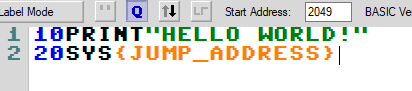
If assembly symbols are included as dependency on a BASIC file the label names are available. This requires a project, and the BASIC file having the assembly file set as depenency and to include its symbols.
Example assembly:
* = 4096 JUMP_ADDRESS inc $d020 rts
The BASIC file includes the symbols of the assembly file and can access the labels.
Literal Value
Also literal values may be included. The values must be specified as hex with a $ prefix. Prefixing a number repeats the value:
| Macro Content | Inserted Content |
|---|---|
| $3000 | 12288 |
| 5 $30 | 4848484848 |